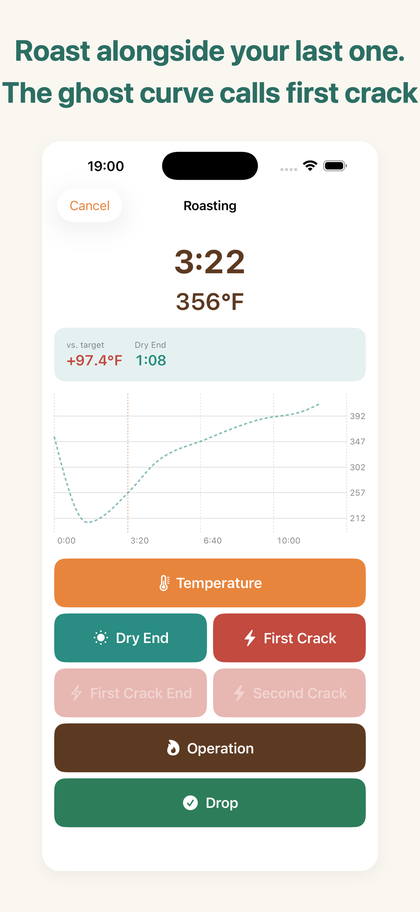
Roast alongside your last one.

HazeLog is a roast-curve logbook for people who roast coffee on a stovetop pan, hand-net or small home roaster.
Save the roast you got right, then run alongside that curve next time to recreate it.

View on the App Store
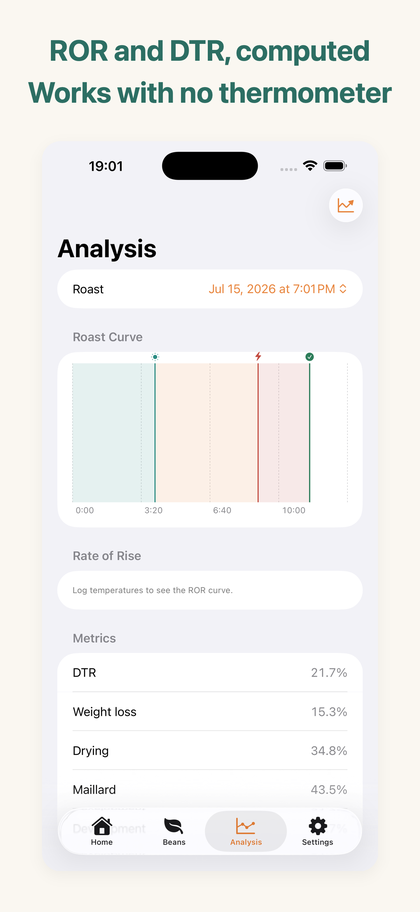
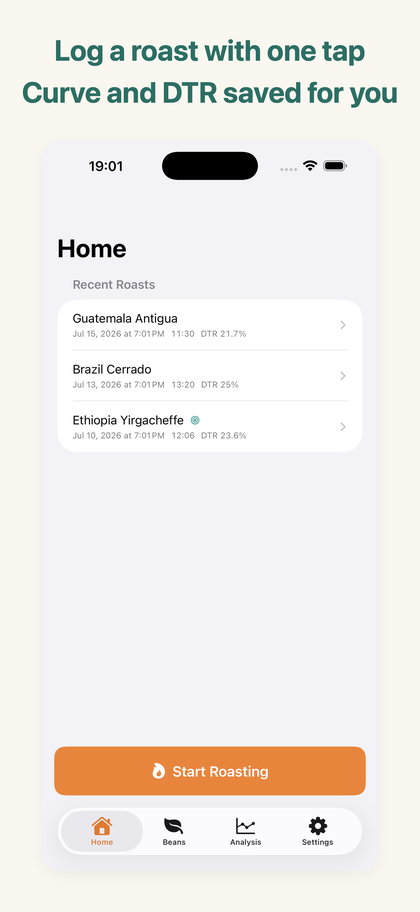
Live roasting screen with elapsed time, current temperature, ghost curve and large logging buttons Analysis screen with the roast curve, phase bands, DTR and weight loss Home screen listing recent roasts with DTR

iPhone / iOS 17.0 or later · English & Japanese · fully offline

No probe required

One tap per event

Charge, temperature, first crack, second crack and drop — each on a 64pt button, designed for one gloved hand and a glance. A mistap can be undone for five seconds.

It becomes a curve

What you tap turns into a time-versus-temperature roast curve, with drying / Maillard / development phase bands and event markers.

Works with no thermometer

Temperature is optional. Even with only first crack and drop, your event timeline and DTR still hold up as a record.

The ghost curve — turn a record into a guide

Mark a past roast as a target profile and its curve is overlaid faintly on the live screen. While you roast, you can see how many degrees you are above target and how long until the next crack.

The ghost curve, ROR/DTR analysis, batch comparison and CSV/PDF export unlock with the one-time HazeLog Pro purchase.

Free and Pro

FeatureFreeHazeLog Pro
Live logging, curve and savingUnlimited
Heat and damper operation log
Green bean masterUp to 3 beansUnlimited
Ghost curve (replay mode)
ROR / DTR analysis
Batch comparison view
CSV / PDF export

HazeLog Pro is a one-time purchase, not a subscription, and can be restored at any time.

How it works

  1. Register a green bean in the Beans tab.
  2. Tap Start Roasting, pick the bean and charge weight, then tap Charge.
  3. Log temperature, first crack and drop with one tap each (temperature optional).
  4. Enter the roasted weight afterwards and weight loss is computed for you.
  5. Mark a roast you liked as a target profile — the next roast runs alongside its ghost curve.

FAQ

Can I use it without a thermometer?

Yes. Temperature is optional. Logging just first crack and drop still gives you a complete event timeline and DTR.

Does it connect to a temperature probe?

No. HazeLog is built around manual logging. BLE probe integration is out of scope; it targets stovetop pans, hand-nets and small home roasters.

Can I use Fahrenheit?

Yes. Switch between °C and °F in Settings. Readings are stored in one normalized unit internally, so past roasts stay comparable when you switch.

Where is my data stored?

Everything stays on your device. No uploads, no tracking, no ads, and no account. The app works in airplane mode.

Is it a subscription?

No. HazeLog Pro is a one-time purchase. Buy it once and keep it.

Can I back up my roasts?

Pro includes CSV and PDF export. iCloud sync is under consideration for a future version.