You can't keep it all.
So keep it properly.

Drawings and crafts come home from school every week. Every piece has a memory in it — and the shelf is already full.
SakuLog photographs each one beautifully so you can let the original go without guilt.

View on the App Store
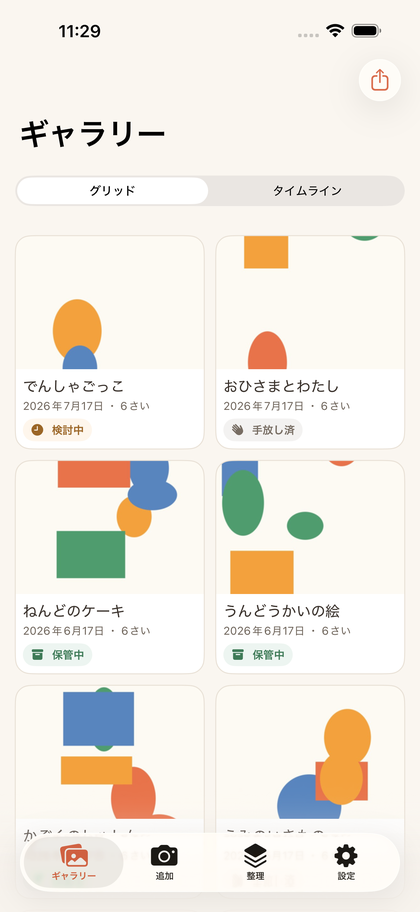
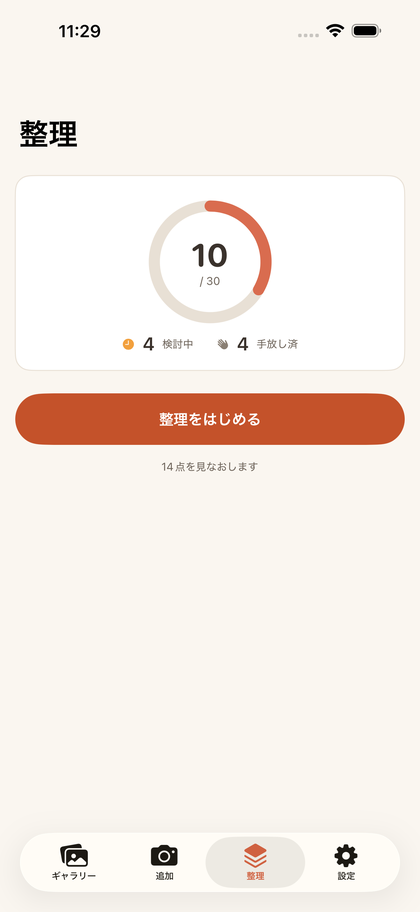
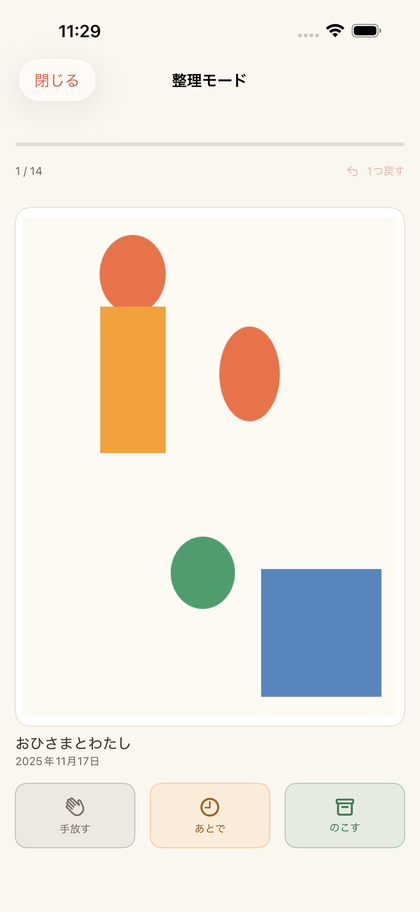
Gallery screen. Artworks laid out as cards, each with a date, age and storage status Organize screen. A ring showing how many originals are kept against a goal Organize mode. A single artwork card with Release, Later and Keep buttons

iPhone / iOS 26.0 or later · English & 日本語 · No account required

An album just for their art

Straight and clean

Point the camera at the artwork. The perspective is straightened automatically and the desk and margins trimmed away. Crafts can be captured from as many angles as you like.

Filed by age, automatically

Add your child's birth month and SakuLog works out how old they were for every piece. The timeline groups artworks by age, so their growth becomes the record itself.

Never buried in the camera roll

A dedicated archive for artwork alone — browsable by child, by age and by kind, without wading through everyday photos.

It helps with the hard part: letting go

Plenty of apps will archive photos. What makes SakuLog different is that it supports the decision about the physical original.

See how much you have

The storage dashboard shows the number of physical pieces you're keeping. Set your own rule — "30 pieces a year" — and the gap to your goal is right there in numbers.

Decide with a swipe

Organize mode deals the artworks out one card at a time. Swipe right to keep, left to release, up to decide later. Tapped the wrong one? Undo puts it back.

Released isn't deleted

The photo stays either way. It's simply marked as released. Even after the original goes, the artwork stays here.

Your data stays in your iCloud

Photographs of your children's work are deeply private. SakuLog never asks you to create an account. Your artworks are never sent to a developer's server — they live on this device and in your own iCloud, syncing automatically across devices signed in to the same Apple Account.

No tracking. No ads. Nothing held hostage if the app goes away.

Free and full access

FeatureFreeFull access
ArtworksUp to 50Unlimited
Children1Unlimited
Capture & auto-straighten
Timeline by age
iCloud sync (your devices)
Organizing sessionsOnce a monthUnlimited
Memory summaries
Yearly PDF
Original quality

Full access is a one-time purchase — not a subscription. You can restore it at any time.

How it works

  1. Add your child's name and birth month (the exact day isn't needed).
  2. Capture artworks from the Add tab. They're straightened and saved.
  3. Set how many originals you want to keep under Settings → Storage rule.
  4. Open the Organize tab and swipe through: keep, release, or decide later.
  5. Browse the timeline by age, and export a year as a yearly PDF.

FAQ

Where are the photos stored?

Only on this device and in your own iCloud. They are never sent to a developer's server. No account is required and there is no tracking.

Can I use it on more than one device?

Yes. Devices signed in to the same Apple Account sync automatically through iCloud. This works on the free plan too.

Can I share with family?

Sharing between different Apple Accounts is not supported. You can export a yearly PDF and send that to family who live elsewhere.

What happens to artworks I release?

The photo stays. It is simply marked as released and never disappears from the album.

Can I add siblings?

Yes, with full access there is no limit. Ages are worked out from each child's own birth month, so you can see siblings' artworks from when they were the same age side by side.

Is it a subscription?

No. Full access is a one-time purchase. Buy it once and there is nothing further to pay.

I'm worried about storage space.

By default photos are resized to 3,000px on the long edge — enough for viewing and printing. Settings shows how much space you're using, and full access lets you save at original quality instead.