The maintenance record you can hand over.
Log every AC unit, water tank, pump and pool item in your villa one by one — then hand the whole history to the next owner, tenant or agent as a single PDF.
Built for villas in the UAE, Saudi Arabia, Qatar, Kuwait, Bahrain and Oman. No account. No ads. No analytics or tracking SDKs.
The history exists. It is just scattered.
The AC was serviced last spring. The roof tank was cleaned — some time before Ramadan. The pool pump was replaced, and the invoice is in a WhatsApp thread somewhere. Every villa owner in the Gulf has this history; almost nobody can produce it when it is asked for.
Baytlog keeps it in one place, one entry per unit, so that at handover you are not reconstructing three years from memory.
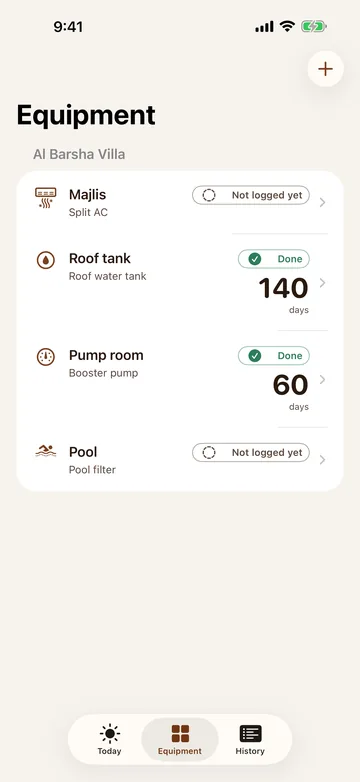
One entry per unit, not one per villa
A villa does not have "an air conditioner". It has the one in the majlis, the one in the maid's room, four in the bedrooms and two outdoor units — and they are serviced on different days by different people. Baytlog gives each one its own record: type, where it is, brand, model, year installed and warranty end.
That is what makes the handover file worth reading. A single line saying "AC serviced" tells the next owner nothing. Eleven lines, one per unit, tell them exactly what they are inheriting.
Suggested intervals, with the source shown
How often should a roof tank be cleaned? The answer differs by country and, in the UAE, by emirate — and for Abu Dhabi it also depends on what the tank is made of and whether it sits above or below ground. Baytlog carries those intervals and shows you the document each one comes from, so you can read it yourself.
They are suggestions, not a legal requirement, and every one of them is editable. Where we could not find an interval published for a country, Baytlog says so plainly and asks you to set your own rather than inventing a number.
Dusty days, and only the ones you agree with
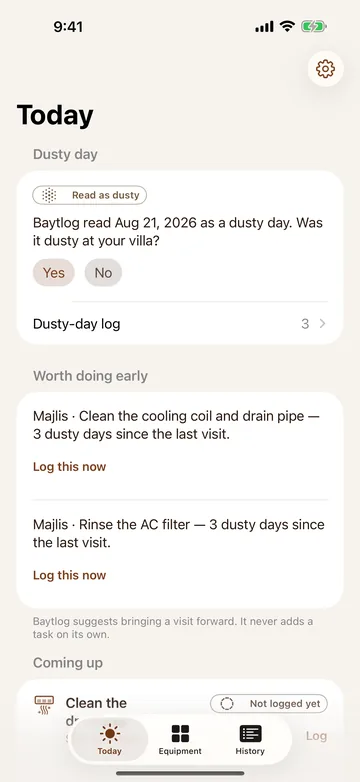
Filters clog faster after a dusty week. Baytlog reads the weather for the area you picked and marks days it judged to be dusty — then asks you whether it was actually dusty at your villa. Only the days you confirm are counted.
When enough confirmed dusty days pile up since the last visit, Baytlog suggests bringing the next service forward. It never books anything, never adds a task on its own, and never claims to report an official weather warning. Weather data comes from Apple Weather.
Dusty-day detection, your confirmation, and the early suggestion are all free. They are not behind the subscription.
The handover file
One A4 PDF: the equipment list, the service history as a timeline, what was spent, and the dusty days you confirmed. You choose the period, whether photos go in (off by default), and whether the file is written in English or Arabic — independently of the language you use the app in.
Every copy carries the same notice on its cover, and it cannot be switched off: this record is compiled by the owner from their own entries, and has not been verified by any third party. Dates marked "Recorded" are set by the device when the entry was saved; dates marked "Performed" are entered by you. That distinction is printed because it is the honest one.
What you paid, in the currency you paid it
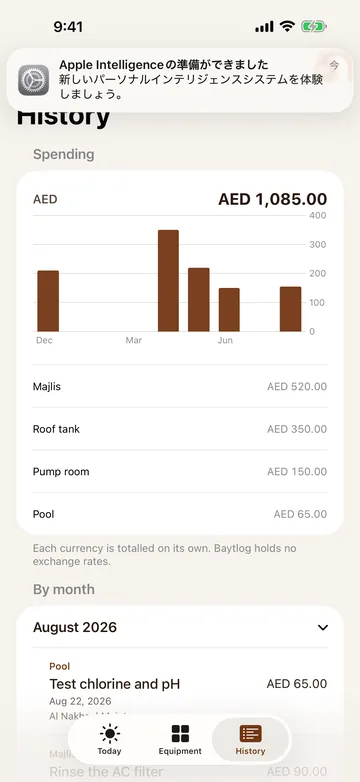
Amounts are recorded in AED, SAR, QAR, KWD, BHD or OMR. Baytlog totals each currency separately and holds no exchange rates, because a made-up conversion is worse than no conversion. Kuwaiti, Bahraini and Omani amounts keep their three decimal places.
Baytlog records what you paid. It does not calculate tax and does not produce a tax document.
Contractors stay yours
The names you type when logging a visit are saved so you do not type them again. That is the whole feature. Baytlog does not share them, does not rank them, does not introduce you to anyone, and has no marketplace.
If you delete a contractor you are asked what should happen to your past entries: keep the name on them, or remove it. Removing it is offered because it is your record — but it is spelled out that you then lose who did the work.
Free and Pro
| Feature | Free | Baytlog Pro |
|---|---|---|
| Villas | 1 | Unlimited |
| Equipment entries | Unlimited | Unlimited |
| Service entries | Unlimited | Unlimited |
| Photos and receipts per entry | 1 | 10 |
| Suggested intervals with sources | ✓ | ✓ |
| Dusty-day log and early suggestions | ✓ | ✓ |
| Contractor address book | ✓ | ✓ |
| Backup and restore | ✓ | ✓ |
| Spending history | Last 12 months | All time |
| Handover file (PDF) | — | ✓ |
| iCloud sync | — | ✓ |
Baytlog Pro is an auto-renewing subscription, billed monthly or yearly and renewing automatically until you cancel. You can cancel at any time in Settings on your iPhone. Prices are shown in the App Store and on the purchase screen.
If the subscription ends, nothing is deleted. Villas above the free limit become read only — you can still open them, read them and include them in a backup. Only new entries in those villas are paused. Photos already attached stay attached.
Recording works offline
Adding equipment, logging a visit, attaching a photo and creating a backup all work with no connection at all. Checking that a Pro subscription is still active does need the internet, but only once every 14 days — in between, Pro features stay on.
Reading dusty days needs a connection at the moment it fetches, no more than once a day per villa. If it cannot fetch, Baytlog records nothing rather than recording "not dusty".
Your location is never requested
Baytlog never uses Location Services, and the only permission it ever asks for is notifications — and only if you switch reminders on yourself in Settings. To read dusty days it needs an approximate area, so you drag a map until the pin is near your villa — and the point is rounded to about one kilometre before it is saved. Your street address is never needed, and there is no field that asks for it.
Photos are attached through the standard iOS photo picker and receipts through the standard file picker. Both hand Baytlog only the items you choose.
Where your data lives
Entries, photos and receipts are stored in Baytlog on your iPhone. There is no account and no sign-in, and the developer has no server to send them to.
With Pro you can turn on iCloud sync, which stores the same records in your own iCloud private database so your other devices see them. That is Apple's storage under your Apple Account; the developer cannot read it. iCloud sync is off unless you turn it on.
The full backup writes a single file containing every entry plus the original photos and receipts, and it can be restored. Once you share that file it is outside Baytlog's control, so treat it like any other copy of your records.
What Baytlog does not do
- It does not certify anything. Nothing in the app or the PDF is verified by a third party, and it is not a certificate.
- It makes no claim about resale value.
- It does not state a legal obligation. The intervals are published guidance, shown with their source.
- It does not report official weather warnings, air quality or PM10 figures. Dusty days are Baytlog's own reading of the weather, confirmed by you.
- It does not calculate tax or convert between currencies.
- It does not share, rank or recommend contractors.
- It shows no ads and contains no analytics or tracking SDKs.
Requirements
iPhone with iOS 17.0 or later, portrait. Available in the UAE, Saudi Arabia, Qatar, Kuwait, Bahrain and Oman. English and العربية, with full right-to-left layout. Weather data is provided by Apple Weather.
Screens
Baytlog
Coming soon. This page will be updated at release.